mini_shell
https://github.com/eumgil0812/os/blob/main/mini_shell.c
🧭 1. Why Build a Mini Shell?
If you’ve ever dreamed of building your own operating system, you’ve probably asked yourself at least once:
“How does a shell actually read and execute commands?”
When I first got into OS development, before worrying about the kernel, I was more curious about how a shell launches and manages processes.
After all, whether it’s a bootloader, a kernel, or a userspace program, the structure of
👉 reading commands →
👉 executing processes →
👉 handling input and output
is the backbone of any OS.
In this post, we’ll build a very simple Mini Shell using only four fundamental system calls:
fork()execvp()waitpid()pipe()
🧾 2. Full Source Code
#include <stdio.h>
#include <stdlib.h>
#include <string.h>
#include <unistd.h>
#include <sys/wait.h>

#define MAX_CMD 1024
#define MAX_ARGS 64

void parse_command(char *cmd, char **args) {
    int i = 0;
    args[i] = strtok(cmd, " \n");
    while (args[i] != NULL) {
        i++;
        args[i] = strtok(NULL, " \n");
    }
}

int main() {
    char cmd[MAX_CMD];
    char *args1[MAX_ARGS], *args2[MAX_ARGS];

    while (1) {
        printf("mini-shell> ");
        fflush(stdout);
        if (fgets(cmd, MAX_CMD, stdin) == NULL) break;

        // handle exit command
        if (strncmp(cmd, "exit", 4) == 0) break;

        // check if there's a pipe
        char *pipe_pos = strchr(cmd, '|');
        if (pipe_pos) {
            *pipe_pos = '\0';
            pipe_pos++;

            parse_command(cmd, args1);
            parse_command(pipe_pos, args2);

            // null check to avoid empty pipe segments
            if (args1[0] == NULL || args2[0] == NULL) {
                fprintf(stderr, "Invalid pipe command.\n");
                continue;
            }

            int fd[2];
            if (pipe(fd) == -1) {
                perror("pipe failed");
                continue;
            }

            pid_t pid1 = fork();
            if (pid1 < 0) {
                perror("fork failed");
                continue;
            }

            if (pid1 == 0) {
                // left command stdout → pipe
                dup2(fd[1], STDOUT_FILENO);
                close(fd[0]);
                close(fd[1]);
                execvp(args1[0], args1);
                perror("execvp left");
                exit(EXIT_FAILURE);
            }

            pid_t pid2 = fork();
            if (pid2 < 0) {
                perror("fork failed");
                continue;
            }

            if (pid2 == 0) {
                // right command stdin ← pipe
                dup2(fd[0], STDIN_FILENO);
                close(fd[0]);
                close(fd[1]);
                execvp(args2[0], args2);
                perror("execvp right");
                exit(EXIT_FAILURE);
            }

            close(fd[0]);
            close(fd[1]);
            waitpid(pid1, NULL, 0);
            waitpid(pid2, NULL, 0);

        } else {
            // single command execution
            parse_command(cmd, args1);
            if (args1[0] == NULL) continue; // filter empty commands

            pid_t pid = fork();
            if (pid < 0) {
                perror("fork failed");
                continue;
            }

            if (pid == 0) {
                execvp(args1[0], args1);
                perror("execvp");
                exit(EXIT_FAILURE);
            } else {
                waitpid(pid, NULL, 0);
            }
        }
    }

    return 0;
}
🧠 3. Core Logic — pipe, dup2, fork, wait
① Splitting the command line
*pipe_pos = '\0';
pipe_pos++;
parse_command(cmd, args1);
parse_command(pipe_pos, args2);
Replace
|with'\0'to break the input string into two segments.Left →
args1(first command)Right →
args2(second command)
Null checks ensure we don’t process empty segments like
|orls |.
② Creating the pipe
int fd[2];
pipe(fd);
fd[0]→ read end (will be connected to stdin)fd[1]→ write end (will be connected to stdout)
③ First child: execute the left command
pid_t pid1 = fork();
if (pid1 == 0) {
    dup2(fd[1], STDOUT_FILENO);
    close(fd[0]);
    close(fd[1]);
    execvp(args1[0], args1);
}
The first child process redirects
stdoutto the pipe’s write end.Everything it prints goes into the pipe.
Then it replaces itself with the left-side command (
ls, for example).
④ Second child: execute the right command
pid_t pid2 = fork();
if (pid2 == 0) {
    dup2(fd[0], STDIN_FILENO);
    close(fd[0]);
    close(fd[1]);
    execvp(args2[0], args2);
}
The second child redirects
stdinto the pipe’s read end.It reads the output from the first child through the pipe.
Then executes the right-side command (
grepfor example).
⑤ Parent: close FDs and wait
close(fd[0]);
close(fd[1]);
waitpid(pid1, NULL, 0);
waitpid(pid2, NULL, 0);
The parent closes both ends of the pipe (important for EOF signaling).
Waits for both child processes to finish to prevent zombies.
🧼 4. Error Handling & Filtering
| Check | Reason |
args[0] == NULL | Prevent executing empty commands |
pipe() failure | Could happen if system resources are low |
fork() failure | Max process limit |
close() properly | Required for EOF signaling |
perror() logging | Easier debugging |
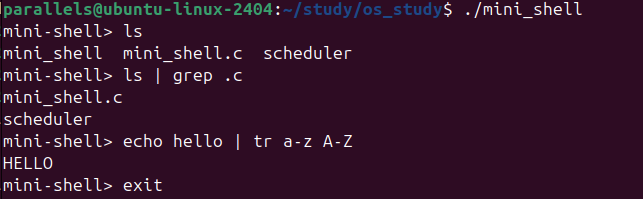
🧪 5. Example Run
🏁 6. Conclusion
This Mini Shell is simple, but it packs in some of the most fundamental concepts of operating systems:
fork()→ process creationexecvp()→ replace the process image with a new programpipe()→ inter-process communicationdup2()→ I/O redirectionwaitpid()→ child process management
Understanding this structure gives you a solid foundation to later build:
A basic kernel shell
An interactive UEFI shell
A shell environment after booting OS