Assembly Language Programming(2) Addressing Mode
Immediate addressing
The code we used in the previous post was as follows.
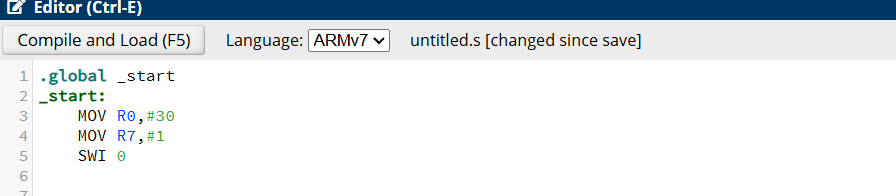
This loads an immediate value into the register. This is called immediate addressing.
Indirect Addressing
✅ Difference Between LDR R1, [R0] and LDR R1, R0
These two instructions work completely differently in ARM assembly.
The presence or absence of square brackets ([ ]) determines how the value is loaded.
1️⃣ LDR R1, [R0] → Indirect Addressing (Memory Access)
LDR R1, [R0]
Loads the value stored at the memory address contained in R0 into R1.
In other words, R0 acts as a pointer to memory.
It does NOT load R0’s value directly but instead fetches data from the memory address R0 points to.
✅ Example
.data
value: .word 42  ; Define a word with the value 42

.text
.global _start
_start:
    LDR R0, =value  ; Load the address of 'value' into R0
    LDR R1, [R0]    ; Load the value stored at address R0 into R1
R0holds the memory address ofvalue.After executing
LDR R1, [R0], R1 contains42.
2️⃣ LDR R1, R0 → Immediate Value Load (Incorrect Usage)
LDR R1, R0
This is NOT a valid instruction in ARM syntax.
In ARM,
LDRis typically used for loading values from memory, not for directly copying register values.To copy R0’s value into R1, use
MOVinstead.
✅ Correct Method
MOV R1, R0 ; R1 = R0 (Copies R0’s value into R1)
MOV R1, R0simply copies the value of R0 into R1 (no memory access involved).
✅ Final Comparison
| Instruction | Behavior | Explanation |
LDR R1, [R0] | Loads a value from the memory address stored in R0 | Memory access (pointer-based) |
LDR R1, R0 | Incorrect usage, should use MOV R1, R0 instead | Simple value copy (not memory access) |
✅ Program Execution Summary
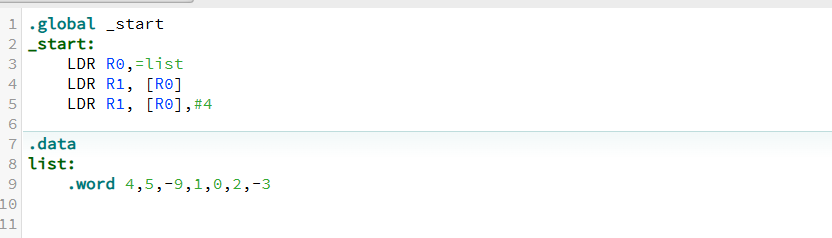
LDR R0, =list- Stores the memory address of
listinR0.
- Stores the memory address of
LDR R1, [R0]- Loads list[0] (4) into R1.
LDR R2, [R0, #4]Loads list[1] (5) into R2.
Here,
#4and#8represent byte-based offsets.✅
LDR R2, [R0, #4]→ Meaning of#4#4means load data from the memory location that is 4 bytes (= 1 word) away from R0's address.In ARMv7,
.wordis 4 bytes (32-bit) in size, so each array element occupies 4 bytes.Therefore,
list[1]is stored 4 bytes afterlist[0].Thus,
LDR R2, [R0, #4]loads the value oflist[1] (5)intoR2.
.data
- Defines the data section, where static data is stored.
list: (Integer Array)
list:
    .word 4,5,-9,1,0,2,-3
Declares an integer array, where each value is stored as a 32-bit (4-byte) word.
Stored in memory as 4, 5, -9, 1, 0, 2, -3.
Little-endian systems may store these values in a different byte order.
Program Execution Summary
Execution starts at
_start.The memory address of
listis loaded into R0.R0can now be used to access the array elements.
✅ Indirect Addressing vs Direct Addressing
| Addressing Mode | Description | Example |
| Immediate Addressing | The value is directly included in the instruction. | MOV R0, #30 (R0 = 30) |
| Direct Addressing | Loads a value directly from a specific memory address. | LDR R0, [0x1000] (Load value from address 0x1000) |
| Indirect Addressing | Stores the memory address in a register first, then accesses the value via that register. | LDR R0, =list (Store the address first, then access data) |
In other words, LDR R0, =list follows indirect addressing, where it first stores the address of the list array in R0 and then accesses the data through memory reference. 🚀
LDR R1, [R0] #4 VS LDR R1, [R0, #4]!
✅ Meaning of LDR R1, [R0, #4]!
This instruction uses Pre-Indexed Addressing, meaning the updated address is used to load the value.
✅ How It Works
LDR R1, [R0, #4]!
R0 = R0 + 4(Increment R0 by 4)Load the value from the updated address into R1
In other words, R0 is incremented by 4 first, and then the value from the updated address is loaded into R1.